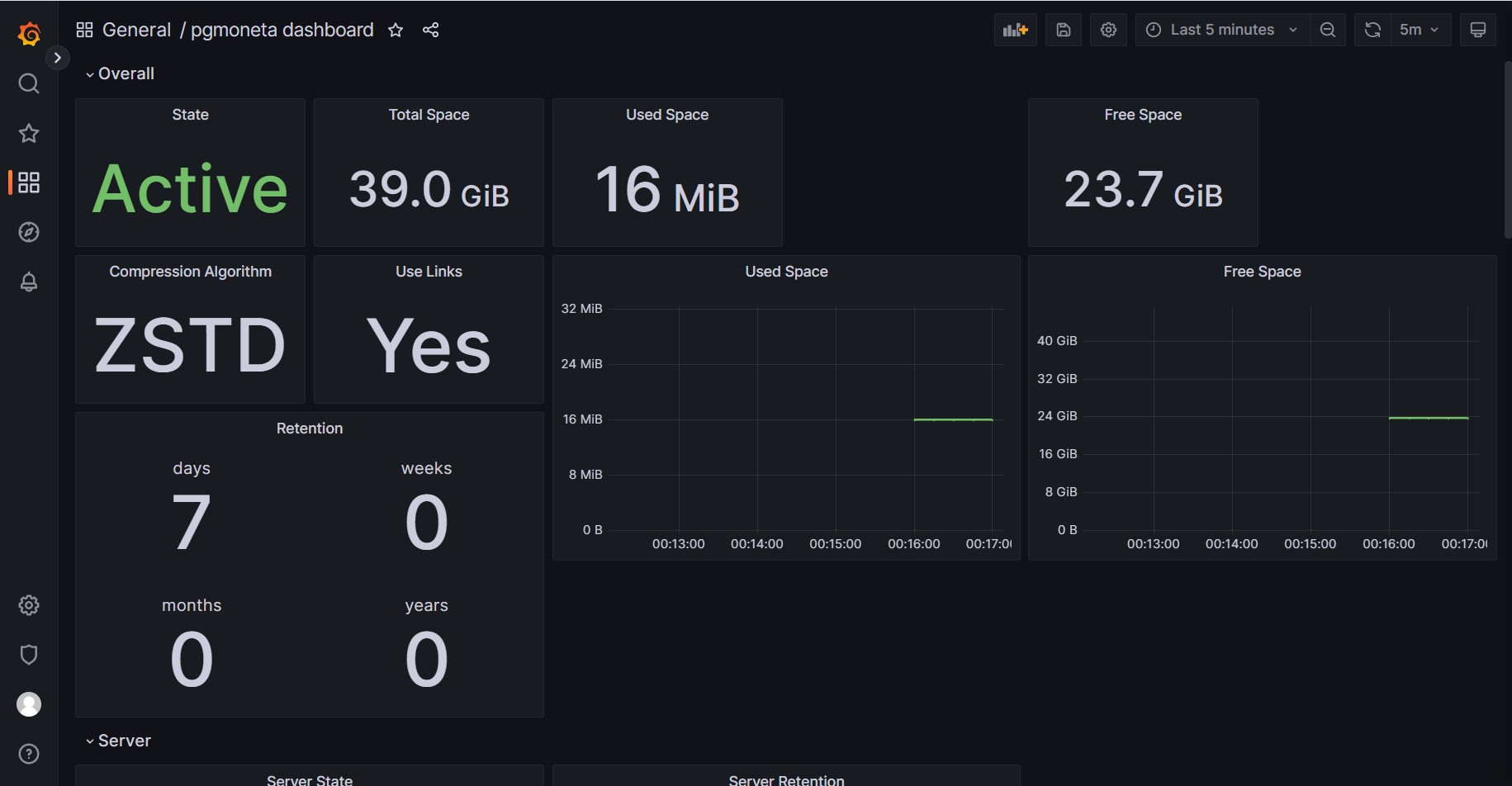
Prometheus / Grafana
pgmoneta support Prometheus metrics.
We enabled the Prometheus metrics in the original configuration by setting
metrics = 5001in pgmoneta.conf.
Access Prometheus metrics
You can now access the metrics via
http://localhost:5001/metricsMetrics
The following metrics are available. pgmoneta_state
Provides the operational status of the pgmoneta backup service itself, indicating if it's running (1) or stopped/failed (0).
| Value | Description |
|---|---|
| 1 | Running |
| 0 | Stopped or encountered a fatal error during startup/runtime |
pgmoneta_version
Exposes the version of the running pgmoneta service through labels.
| Attribute | Description |
|---|---|
| version | The semantic version string of the running pgmoneta (e.g., "0.20.0"). |
pgmoneta_fips
Reports whether pgmoneta's own OpenSSL library is running in FIPS mode (1) or not (0).
pgmoneta_logging_info
Counts the total number of informational (INFO level) log messages produced by pgmoneta since its last startup.
pgmoneta_logging_warn
Accumulates the total count of warning (WARN level) messages logged by pgmoneta, potentially indicating recoverable issues.
pgmoneta_logging_error
Tallies the total number of error (ERROR level) messages from pgmoneta, often signaling problems needing investigation.
pgmoneta_logging_fatal
Records the total count of fatal (FATAL level) errors encountered by pgmoneta, usually indicating service termination.
pgmoneta_retention_days
Shows the global retention policy in days for pgmoneta backups.
| Value | Description |
|---|---|
| 0 | No day-based retention configured |
pgmoneta_retention_weeks
Shows the global retention policy in weeks for pgmoneta backups.
| Value | Description |
|---|---|
| 0 | No week-based retention configured |
pgmoneta_retention_months
Shows the global retention policy in months for pgmoneta backups.
| Value | Description |
|---|---|
| 0 | No month-based retention configured |
pgmoneta_retention_years
Shows the global retention policy in years for pgmoneta backups.
| Value | Description |
|---|---|
| 0 | No year-based retention configured |
pgmoneta_retention_server
Shows the retention policy for a specific server by parameter type (days, weeks, months, years).
| Attribute | Description |
|---|---|
| name | The configured name/identifier for the PostgreSQL server. |
| parameter | The retention parameter type (days, weeks, months, years). |
pgmoneta_compression
Indicates the compression method used for backups (0=none, 1=gzip, 2=zstd, 3=lz4, 4=bzip2).
| Value | Description |
|---|---|
| 0 | No compression |
| 1 | gzip compression |
| 2 | zstd compression |
| 3 | lz4 compression |
| 4 | bzip2 compression |
pgmoneta_used_space
Reports the total disk space in bytes currently used by pgmoneta for all backups and data.
pgmoneta_free_space
Reports the free disk space in bytes available to pgmoneta for storing backups.
pgmoneta_total_space
Reports the total disk space in bytes available to pgmoneta (used + free).
pgmoneta_wal_shipping
Indicates if WAL shipping is enabled for a server (1=enabled, 0=disabled).
| Attribute | Description |
|---|---|
| name | The configured name/identifier for the PostgreSQL server. |
pgmoneta_wal_shipping_used_space
Reports the disk space in bytes used for WAL shipping files for a specific server.
| Attribute | Description |
|---|---|
| name | The configured name/identifier for the PostgreSQL server. |
pgmoneta_wal_shipping_free_space
Reports the free disk space in bytes available for WAL shipping for a specific server.
| Attribute | Description |
|---|---|
| name | The configured name/identifier for the PostgreSQL server. |
pgmoneta_wal_shipping_total_space
Reports the total disk space in bytes allocated for WAL shipping for a specific server.
| Attribute | Description |
|---|---|
| name | The configured name/identifier for the PostgreSQL server. |
pgmoneta_workspace
Reports the disk space in bytes used by the workspace directory for a specific server.
| Attribute | Description |
|---|---|
| name | The configured name/identifier for the PostgreSQL server. |
pgmoneta_workspace_free_space
Reports the free disk space in bytes available in the workspace for a specific server.
| Attribute | Description |
|---|---|
| name | The configured name/identifier for the PostgreSQL server. |
pgmoneta_workspace_total_space
Reports the total disk space in bytes available in the workspace for a specific server.
| Attribute | Description |
|---|---|
| name | The configured name/identifier for the PostgreSQL server. |
pgmoneta_hot_standby
Reports the disk space in bytes used for hot standby functionality for a specific server.
| Attribute | Description |
|---|---|
| name | The configured name/identifier for the PostgreSQL server. |
pgmoneta_hot_standby_free_space
Reports the free disk space in bytes available for hot standby for a specific server.
| Attribute | Description |
|---|---|
| name | The configured name/identifier for the PostgreSQL server. |
pgmoneta_hot_standby_total_space
Reports the total disk space in bytes allocated for hot standby for a specific server.
| Attribute | Description |
|---|---|
| name | The configured name/identifier for the PostgreSQL server. |
pgmoneta_server_timeline
Shows the current timeline number that a PostgreSQL server is operating on.
| Attribute | Description |
|---|---|
| name | The configured name/identifier for the PostgreSQL server. |
pgmoneta_server_parent_tli
Shows the parent timeline identifier for a specific timeline on a server.
| Attribute | Description |
|---|---|
| name | The configured name/identifier for the PostgreSQL server. |
| tli | The timeline identifier. |
pgmoneta_server_timeline_switchpos
Shows the WAL switch position for a timeline on a server (displayed as hexadecimal).
| Attribute | Description |
|---|---|
| name | The configured name/identifier for the PostgreSQL server. |
| tli | The timeline identifier. |
| walpos | The WAL position in hexadecimal format. |
pgmoneta_server_workers
Reports the number of worker processes currently active for a specific server.
| Attribute | Description |
|---|---|
| name | The configured name/identifier for the PostgreSQL server. |
pgmoneta_server_online
Indicates if the PostgreSQL server is online and reachable (1=online, 0=offline).
| Attribute | Description | Values |
|---|---|---|
| name | The configured name/identifier for the PostgreSQL server. | 1: Server is online and accessible, 0: Server is offline or unreachable |
pgmoneta_server_primary
Indicates if the PostgreSQL server is operating as a primary (1) or standby (0).
| Attribute | Description | Values |
|---|---|---|
| name | The configured name/identifier for the PostgreSQL server. | 1: Server is a primary (not in recovery), 0: Server is a standby/replica (in recovery) |
pgmoneta_server_valid
Indicates if the server configuration and connection are valid (1=valid, 0=invalid).
| Attribute | Description | Values |
|---|---|---|
| name | The configured name/identifier for the PostgreSQL server. | 1: Server configuration is valid, 0: Server configuration has issues |
pgmoneta_wal_streaming
Indicates if WAL streaming is currently active for a server (1=active, 0=inactive).
| Attribute | Description | Values |
|---|---|---|
| name | The configured name/identifier for the PostgreSQL server. | 1: WAL streaming is active, 0: WAL streaming is not active |
pgmoneta_server_operation_count
Reports the total count of successful client operations performed on a server.
| Attribute | Description |
|---|---|
| name | The configured name/identifier for the PostgreSQL server. |
pgmoneta_server_failed_operation_count
Reports the total count of failed client operations attempted on a server.
| Attribute | Description |
|---|---|
| name | The configured name/identifier for the PostgreSQL server. |
pgmoneta_server_last_operation_time
Reports the timestamp of the most recent successful client operation on a server.
| Attribute | Description |
|---|---|
| name | The configured name/identifier for the PostgreSQL server. |
pgmoneta_server_last_failed_operation_time
Reports the timestamp of the most recent failed client operation on a server.
| Attribute | Description |
|---|---|
| name | The configured name/identifier for the PostgreSQL server. |
pgmoneta_server_checksums
Indicates if data checksums are enabled on the PostgreSQL server (1=enabled, 0=disabled).
| Attribute | Description | Values |
|---|---|---|
| name | The configured name/identifier for the PostgreSQL server. | 1: Data checksums are enabled, 0: Data checksums are disabled |
pgmoneta_server_fips_mode
Reports whether PostgreSQL is running in FIPS mode.
Detection method varies by PostgreSQL version:
PostgreSQL 14-17:
- Uses
pgmoneta_ext_fips()from the pgmoneta_ext extension - Requires pgmoneta_ext to be installed (optional, returns 0 if not installed)
- Checks the PostgreSQL backend's own OpenSSL (supports OpenSSL 1.1 and 3.0)
PostgreSQL 18+:
- Uses the
fips_mode()function from pgcrypto extension - Requires pgcrypto extension (optional, returns 0 if not installed)
- No special privileges required
| Attribute | Description | Values |
|---|---|---|
| name | The configured name/identifier for the PostgreSQL server. | 1: FIPS mode is active, 0: FIPS mode is not active or not detectable |
pgmoneta_server_summarize_wal
Indicates if WAL summarization is enabled on the PostgreSQL server (1=enabled, 0=disabled).
| Attribute | Description | Values |
|---|---|---|
| name | The configured name/identifier for the PostgreSQL server. | 1: WAL summarization is enabled, 0: WAL summarization is disabled |
pgmoneta_server_extensions_detected
Reports the total number of PostgreSQL extensions detected on the server.
| Attribute | Description |
|---|---|
| name | The configured name/identifier for the PostgreSQL server. |
pgmoneta_server_extension
Provides information about installed PostgreSQL extensions on the server.
| Attribute | Description |
|---|---|
| name | The configured name/identifier for the PostgreSQL server. |
| extension | The name of the installed extension. |
| version | The version of the installed extension. |
| comment | A description of what the extension does. |
pgmoneta_extension_pgmoneta_ext
Reports the status of the pgmoneta extension on the PostgreSQL server.
| Attribute | Description | Values |
|---|---|---|
| name | The configured name/identifier for the PostgreSQL server. | 1: Extension is installed and available, 0: Extension is not installed |
| version | The version of the pgmoneta extension, or "not_installed" if not present. |
pgmoneta_backup_oldest
Shows the label/timestamp of the oldest valid backup for a server, or 0 if no valid backups exist.
| Attribute | Description |
|---|---|
| name | The configured name/identifier for the PostgreSQL server. |
pgmoneta_backup_newest
Shows the label/timestamp of the newest valid backup for a server, or 0 if no valid backups exist.
| Attribute | Description |
|---|---|
| name | The configured name/identifier for the PostgreSQL server. |
pgmoneta_backup_valid
Reports the total number of valid/healthy backups available for a server.
| Attribute | Description |
|---|---|
| name | The configured name/identifier for the PostgreSQL server. |
pgmoneta_backup_invalid
Reports the total number of invalid/corrupted backups for a server.
| Attribute | Description |
|---|---|
| name | The configured name/identifier for the PostgreSQL server. |
pgmoneta_backup
Indicates if a specific backup is valid (1) or invalid (0).
| Attribute | Description | Values |
|---|---|---|
| name | The configured name/identifier for the PostgreSQL server. | 1: Backup is valid and usable, 0: Backup is invalid or corrupted |
| label | The backup identifier/timestamp. |
pgmoneta_backup_version
Shows the PostgreSQL version information for a specific backup.
| Attribute | Description |
|---|---|
| name | The configured name/identifier for the PostgreSQL server. |
| label | The backup identifier/timestamp. |
| major | The major version number of PostgreSQL. |
| minor | The minor version number of PostgreSQL. |
pgmoneta_backup_total_elapsed_time
Reports the total time in seconds taken to complete a backup operation.
| Attribute | Description |
|---|---|
| name | The configured name/identifier for the PostgreSQL server. |
| label | The backup identifier/timestamp. |
pgmoneta_backup_basebackup_elapsed_time
Reports the time in seconds taken for the base backup phase of a backup operation.
| Attribute | Description |
|---|---|
| name | The configured name/identifier for the PostgreSQL server. |
| label | The backup identifier/timestamp. |
pgmoneta_backup_manifest_elapsed_time
Reports the time in seconds taken for manifest processing during a backup operation.
| Attribute | Description |
|---|---|
| name | The configured name/identifier for the PostgreSQL server. |
| label | The backup identifier/timestamp. |
pgmoneta_backup_compression_zstd_elapsed_time
Reports the time in seconds taken for zstd compression during a backup operation.
| Attribute | Description |
|---|---|
| name | The configured name/identifier for the PostgreSQL server. |
| label | The backup identifier/timestamp. |
pgmoneta_backup_compression_gzip_elapsed_time
Reports the time in seconds taken for gzip compression during a backup operation.
| Attribute | Description |
|---|---|
| name | The configured name/identifier for the PostgreSQL server. |
| label | The backup identifier/timestamp. |
pgmoneta_backup_compression_bzip2_elapsed_time
Reports the time in seconds taken for bzip2 compression during a backup operation.
| Attribute | Description |
|---|---|
| name | The configured name/identifier for the PostgreSQL server. |
| label | The backup identifier/timestamp. |
pgmoneta_backup_compression_lz4_elapsed_time
Reports the time in seconds taken for lz4 compression during a backup operation.
| Attribute | Description |
|---|---|
| name | The configured name/identifier for the PostgreSQL server. |
| label | The backup identifier/timestamp. |
pgmoneta_backup_encryption_elapsed_time
Reports the time in seconds taken for encryption during a backup operation.
| Attribute | Description |
|---|---|
| name | The configured name/identifier for the PostgreSQL server. |
| label | The backup identifier/timestamp. |
pgmoneta_backup_linking_elapsed_time
Reports the time in seconds taken for hard linking operations during a backup.
| Attribute | Description |
|---|---|
| name | The configured name/identifier for the PostgreSQL server. |
| label | The backup identifier/timestamp. |
pgmoneta_backup_remote_ssh_elapsed_time
Reports the time in seconds taken for SSH remote storage operations during a backup.
| Attribute | Description |
|---|---|
| name | The configured name/identifier for the PostgreSQL server. |
| label | The backup identifier/timestamp. |
pgmoneta_backup_remote_s3_elapsed_time
Reports the time in seconds taken for S3 remote storage operations during a backup.
| Attribute | Description |
|---|---|
| name | The configured name/identifier for the PostgreSQL server. |
| label | The backup identifier/timestamp. |
pgmoneta_backup_remote_azure_elapsed_time
Reports the time in seconds taken for Azure remote storage operations during a backup.
| Attribute | Description |
|---|---|
| name | The configured name/identifier for the PostgreSQL server. |
| label | The backup identifier/timestamp. |
pgmoneta_backup_start_timeline
Shows the timeline number at the start of a backup operation.
| Attribute | Description |
|---|---|
| name | The configured name/identifier for the PostgreSQL server. |
| label | The backup identifier/timestamp. |
pgmoneta_backup_end_timeline
Shows the timeline number at the end of a backup operation.
| Attribute | Description |
|---|---|
| name | The configured name/identifier for the PostgreSQL server. |
| label | The backup identifier/timestamp. |
pgmoneta_backup_start_walpos
Shows the WAL position where the backup started (displayed as hexadecimal).
| Attribute | Description |
|---|---|
| name | The configured name/identifier for the PostgreSQL server. |
| label | The backup identifier/timestamp. |
| walpos | The WAL position in hexadecimal format. |
pgmoneta_backup_checkpoint_walpos
Shows the checkpoint WAL position for a backup (displayed as hexadecimal).
| Attribute | Description |
|---|---|
| name | The configured name/identifier for the PostgreSQL server. |
| label | The backup identifier/timestamp. |
| walpos | The checkpoint WAL position in hexadecimal format. |
pgmoneta_backup_end_walpos
Shows the WAL position where the backup ended (displayed as hexadecimal).
| Attribute | Description |
|---|---|
| name | The configured name/identifier for the PostgreSQL server. |
| label | The backup identifier/timestamp. |
| walpos | The ending WAL position in hexadecimal format. |
pgmoneta_restore_newest_size
Reports the size in bytes of the most recent restore operation for a server.
| Attribute | Description |
|---|---|
| name | The configured name/identifier for the PostgreSQL server. |
pgmoneta_backup_newest_size
Reports the size in bytes of the most recent backup for a server.
| Attribute | Description |
|---|---|
| name | The configured name/identifier for the PostgreSQL server. |
pgmoneta_restore_size
Reports the total size in bytes of a specific restore operation.
pgmoneta_restore_size_increment
Reports the incremental size in bytes for a specific restore operation.
| Attribute | Description |
|---|---|
| name | The configured name/identifier for the PostgreSQL server. |
| label | The backup/restore identifier/timestamp. |
pgmoneta_backup_size
Reports the total size in bytes of a specific backup.
| Attribute | Description |
|---|---|
| name | The configured name/identifier for the PostgreSQL server. |
| label | The backup identifier/timestamp. |
pgmoneta_backup_compression_ratio
Shows the compression ratio achieved for a specific backup (compressed size / original size).
| Attribute | Description |
|---|---|
| name | The configured name/identifier for the PostgreSQL server. |
| label | The backup identifier/timestamp. |
pgmoneta_backup_throughput
Reports the overall backup throughput in MB/s for a specific backup operation.
| Attribute | Description |
|---|---|
| name | The configured name/identifier for the PostgreSQL server. |
| label | The backup identifier/timestamp. |
pgmoneta_backup_basebackup_mbs
Reports the base backup throughput in MB/s for a specific backup operation.
| Attribute | Description |
|---|---|
| name | The configured name/identifier for the PostgreSQL server. |
| label | The backup identifier/timestamp. |
pgmoneta_backup_manifest_mbs
Reports the manifest processing throughput in MB/s for a specific backup operation.
| Attribute | Description |
|---|---|
| name | The configured name/identifier for the PostgreSQL server. |
| label | The backup identifier/timestamp. |
pgmoneta_backup_compression_zstd_mbs
Reports the zstd compression throughput in MB/s for a specific backup operation.
| Attribute | Description |
|---|---|
| name | The configured name/identifier for the PostgreSQL server. |
| label | The backup identifier/timestamp. |
pgmoneta_backup_compression_gzip_mbs
Reports the gzip compression throughput in MB/s for a specific backup operation.
| Attribute | Description |
|---|---|
| name | The configured name/identifier for the PostgreSQL server. |
| label | The backup identifier/timestamp. |
pgmoneta_backup_compression_bzip2_mbs
Reports the bzip2 compression throughput in MB/s for a specific backup operation.
| Attribute | Description |
|---|---|
| name | The configured name/identifier for the PostgreSQL server. |
| label | The backup identifier/timestamp. |
pgmoneta_backup_compression_lz4_mbs
Reports the lz4 compression throughput in MB/s for a specific backup operation.
| Attribute | Description |
|---|---|
| name | The configured name/identifier for the PostgreSQL server. |
| label | The backup identifier/timestamp. |
pgmoneta_backup_encryption_mbs
Reports the encryption throughput in MB/s for a specific backup operation.
| Attribute | Description |
|---|---|
| name | The configured name/identifier for the PostgreSQL server. |
| label | The backup identifier/timestamp. |
pgmoneta_backup_linking_mbs
Reports the hard linking throughput in MB/s for a specific backup operation.
| Attribute | Description |
|---|---|
| name | The configured name/identifier for the PostgreSQL server. |
| label | The backup identifier/timestamp. |
pgmoneta_backup_remote_ssh_mbs
Reports the SSH remote storage throughput in MB/s for a specific backup operation.
| Attribute | Description |
|---|---|
| name | The configured name/identifier for the PostgreSQL server. |
| label | The backup identifier/timestamp. |
pgmoneta_backup_remote_s3_mbs
Reports the S3 remote storage throughput in MB/s for a specific backup operation.
| Attribute | Description |
|---|---|
| name | The configured name/identifier for the PostgreSQL server. |
| label | The backup identifier/timestamp. |
pgmoneta_backup_remote_azure_mbs
Reports the Azure remote storage throughput in MB/s for a specific backup operation.
| Attribute | Description |
|---|---|
| name | The configured name/identifier for the PostgreSQL server. |
| label | The backup identifier/timestamp. |
pgmoneta_backup_retain
Indicates if a backup should be retained (1) or is eligible for deletion (0).
| Attribute | Description | Values |
|---|---|---|
| name | The configured name/identifier for the PostgreSQL server. | 1: Backup should be retained, 0: Backup is eligible for deletion |
| label | The backup identifier/timestamp. |
pgmoneta_backup_total_size
Reports the total size in bytes of all backups for a specific server.
| Attribute | Description |
|---|---|
| name | The configured name/identifier for the PostgreSQL server. |
pgmoneta_wal_total_size
Reports the total size in bytes of all WAL files for a specific server.
| Attribute | Description |
|---|---|
| name | The configured name/identifier for the PostgreSQL server. |
pgmoneta_total_size
Reports the total size in bytes used by a server (backups + WAL + other data).
| Attribute | Description |
|---|---|
| name | The configured name/identifier for the PostgreSQL server. |
pgmoneta_active_backup
Indicates if a backup operation is currently in progress for a server (1=active, 0=inactive).
| Attribute | Description | Values |
|---|---|---|
| name | The configured name/identifier for the PostgreSQL server. | 1: Backup is currently running, 0: No backup is currently running |
pgmoneta_active_restore
Indicates if a restore operation is currently in progress for a server (1=active, 0=inactive).
| Attribute | Description | Values |
|---|---|---|
| name | The configured name/identifier for the PostgreSQL server. | 1: Restore is currently running, 0: No restore is currently running |
pgmoneta_active_archive
Indicates if an archive operation is currently in progress for a server (1=active, 0=inactive).
| Attribute | Description | Values |
|---|---|---|
| name | The configured name/identifier for the PostgreSQL server. | 1: Archive operation is currently running, 0: No archive operation is currently running |
pgmoneta_active_delete
Indicates if a delete operation is currently in progress for a server (1=active, 0=inactive).
| Attribute | Description | Values |
|---|---|---|
| name | The configured name/identifier for the PostgreSQL server. | 1: Delete operation is currently running, 0: No delete operation is currently running |
pgmoneta_active_retention
Indicates if a retention cleanup operation is currently in progress for a server (1=active, 0=inactive).
| Attribute | Description | Values |
|---|---|---|
| name | The configured name/identifier for the PostgreSQL server. | 1: Retention cleanup is currently running, 0: No retention cleanup is currently running |
pgmoneta_progress_percentage
The workflow progress percentage (0-100) for a server.
| Attribute | Description |
|---|---|
| name | The configured name/identifier for the PostgreSQL server. |
| workflow | The current workflow type (e.g. Backup, Restore, Archive). |
| phase | The current workflow phase name. |
pgmoneta_progress_elapsed_time
The elapsed seconds since the current workflow started.
| Attribute | Description |
|---|---|
| name | The configured name/identifier for the PostgreSQL server. |
| workflow | The current workflow type (e.g. Backup, Restore, Archive). |
| phase | The current workflow phase name. |
pgmoneta_progress_total
The total units of work in the current workflow phase.
| Attribute | Description |
|---|---|
| name | The configured name/identifier for the PostgreSQL server. |
| workflow | The current workflow type (e.g. Backup, Restore, Archive). |
| phase | The current workflow phase name. |
pgmoneta_progress_done
The units of work completed in the current workflow phase.
| Attribute | Description |
|---|---|
| name | The configured name/identifier for the PostgreSQL server. |
| workflow | The current workflow type (e.g. Backup, Restore, Archive). |
| phase | The current workflow phase name. |
pgmoneta_current_wal_file
Shows the current WAL filename being streamed or processed for a server.
| Attribute | Description |
|---|---|
| name | The configured name/identifier for the PostgreSQL server. |
| file | The current WAL filename. |
pgmoneta_current_wal_lsn
Shows the current WAL Log Sequence Number (LSN) for a server.
| Attribute | Description |
|---|---|
| name | The configured name/identifier for the PostgreSQL server. |
| lsn | The current WAL LSN in hexadecimal format. |
Transport Level Security support
To add TLS support for Prometheus metrics, first we need a self-signed certificate.
- Generate CA key and certificate
openssl genrsa -out ca.key 2048
openssl req -x509 -new -nodes -key ca.key -sha256 -days 3650 -out ca.crt -subj "/CN=My Local CA"- Generate server key and CSR
openssl genrsa -out server.key 2048
openssl req -new -key server.key -out server.csr -subj "/CN=localhost"- Create a config file for Subject Alternative Name
cat > server.ext << EOF
authorityKeyIdentifier=keyid,issuer
basicConstraints=CA:FALSE
keyUsage = digitalSignature, nonRepudiation, keyEncipherment, dataEncipherment
subjectAltName = @alt_names

[alt_names]
DNS.1 = localhost
IP.1 = 127.0.0.1
EOF- Sign the server certificate with our CA
openssl x509 -req -in server.csr -CA ca.crt -CAkey ca.key -CAcreateserial -out server.crt -days 3650 -sha256 -extfile server.ext- Generate client key and certificate
openssl genrsa -out client.key 2048
openssl req -new -key client.key -out client.csr -subj "/CN=Client Certificate"
openssl x509 -req -in client.csr -CA ca.crt -CAkey ca.key -CAcreateserial -out client.crt -days 3650 -sha256- Create PKCS#12 file (Optional, needed for browser import)
openssl pkcs12 -export -out client.p12 -inkey client.key -in client.crt -certfile ca.crt -passout pass:<your_password>Edit pgmoneta.conf to add the following keys under pgmoneta section:
[pgmoneta]
.
.
.
metrics_cert_file=<path_to_server_cert_file>
metrics_key_file=<path_to_server_key_file>
metrics_ca_file=<path_to_ca_file>
You can now access the metrics at https://localhost:5001 using curl as follows:
curl -v -L "https://localhost:5001" --cacert <path_to_ca_file> --cert <path_to_client_cert_file> --key <path_to_client_key_file>(Optional) If you want to access the page through the browser:
First install the certificates on your system
- For Fedora:
# Create directory if it doesn't exist sudo mkdir -p /etc/pki/ca-trust/source/anchors/ # Copy CA cert to the trust store sudo cp ca.crt /etc/pki/ca-trust/source/anchors/ # Update the CA trust store sudo update-ca-trust extract- For Ubuntu:
# Copy the CA certificate to the system certificate store sudo cp ca.crt /usr/local/share/ca-certificates/ # Update the CA certificate store sudo update-ca-certificates- For MacOS:
- Open Keychain Access and import the certificate file
- Set the certificate to "Always Trust"
For browsers like Firefox
- Go to Menu → Preferences → Privacy & Security
- Scroll down to "Certificates" section and click "View Certificates"
- Go to "Authorities" tab and click "Import"
- Select your
ca.crtfile - Check "Trust this CA to identify websites" and click OK
- Go to "Your Certificates" tab
- Click "Import" and select the
client.p12file - Enter the password you set when creating the PKCS#12 file
For browsers like Chrome/Chromium
- For client certificates, go to Settings → Privacy and security → Security → Manage certificates
- Click on "Import" and select your
client.p12file - Enter the password you set when creating it
You can now access metrics at https://localhost:5001
Grafana
Enable the endpoint by adding
scrape_configs:
  - job_name: 'pgmoneta'
    metrics_path: '/metrics'
    static_configs:
      - targets: ['localhost:5001']
to the Grafana configuration.
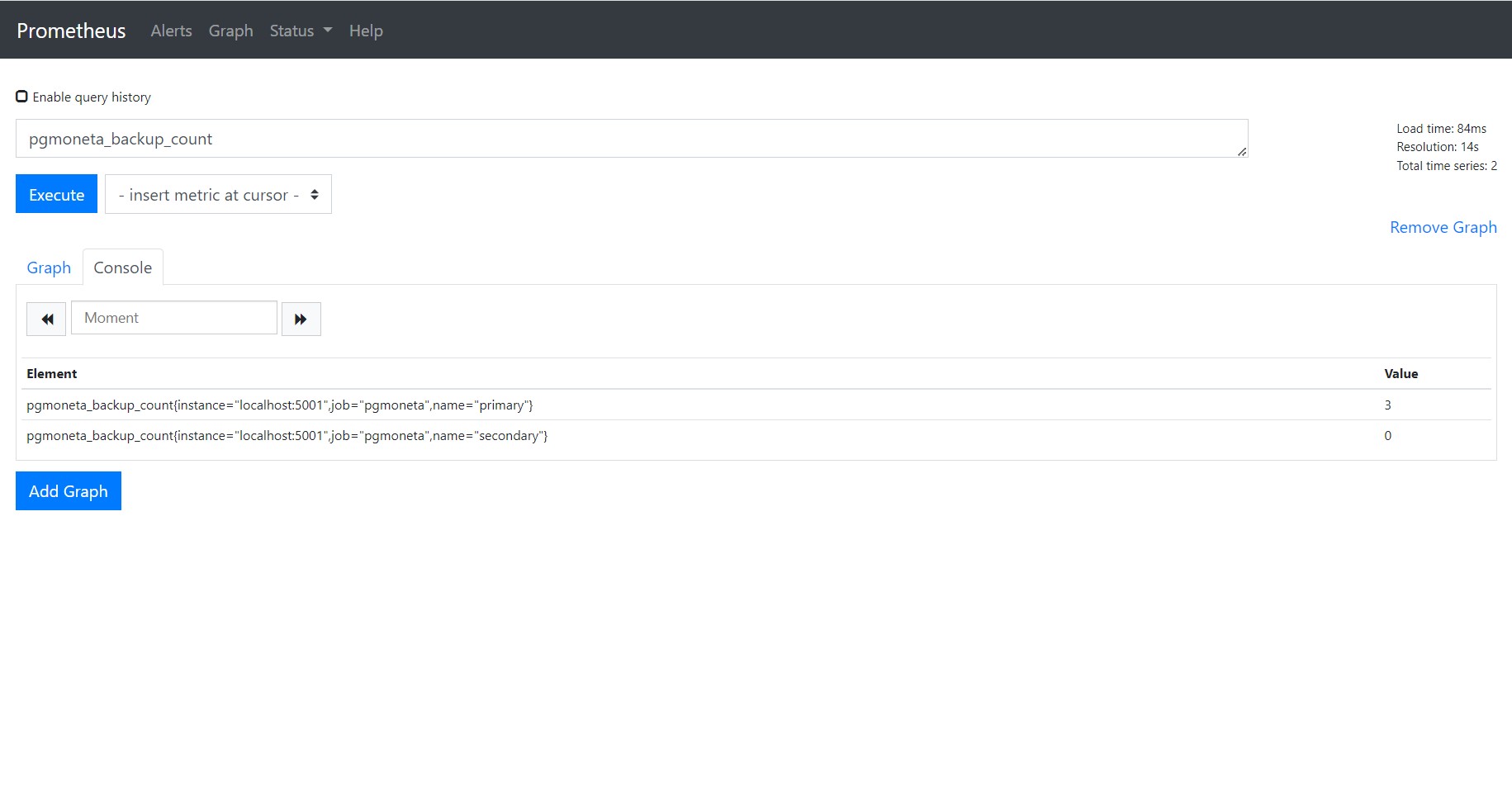
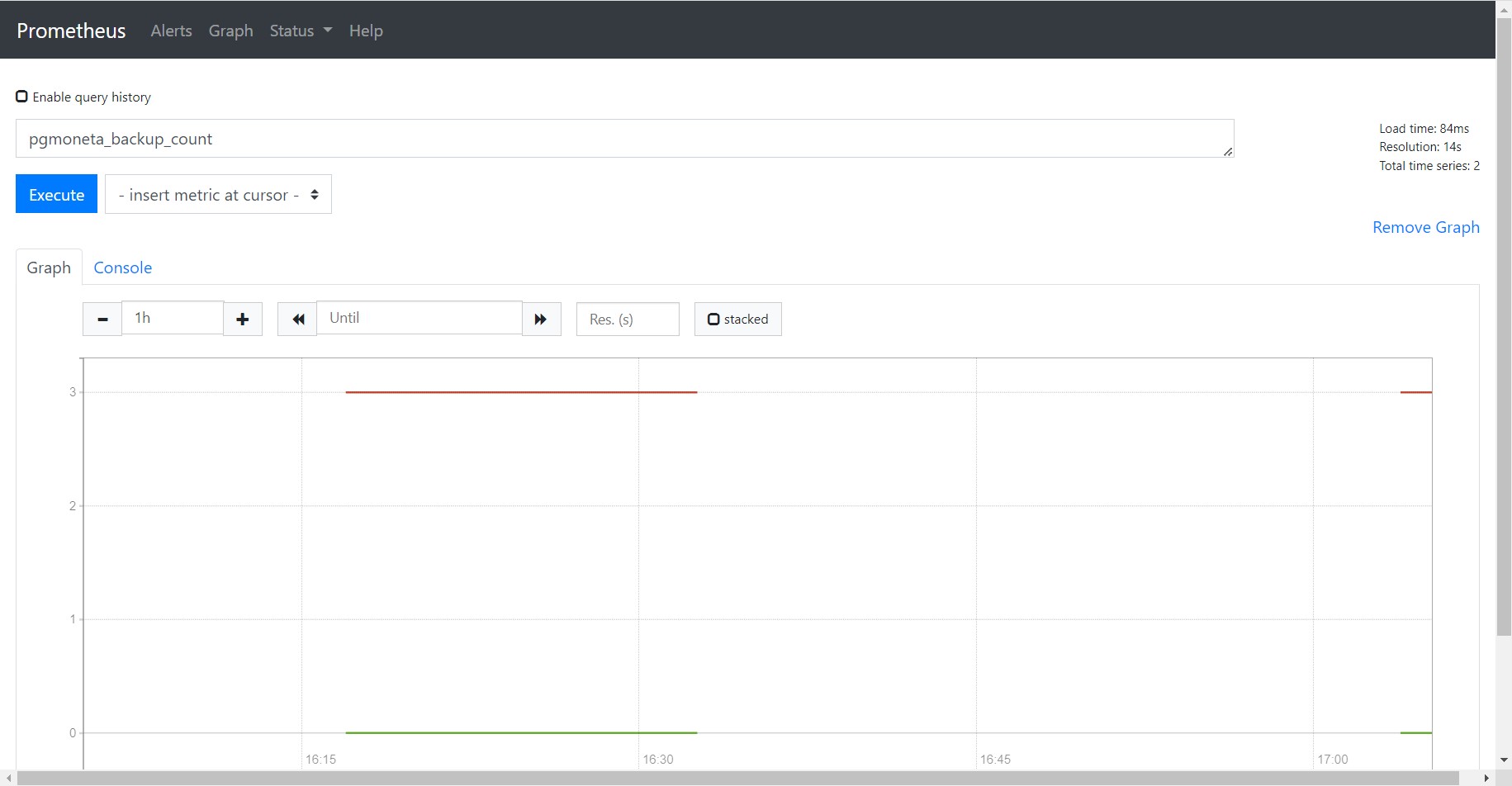
Then the Prometheus service will query your pgmoneta metrics every 15 seconds and package them as time-series data. You can query your pgmoneta metrics and watch their changes as time passed in Prometheus web page (default port is 9090).
Import a Grafana dashboard
Although Prometheus provides capacity of querying and monitoring metrics, we can not customize graphs for each metric and provide a unified view.
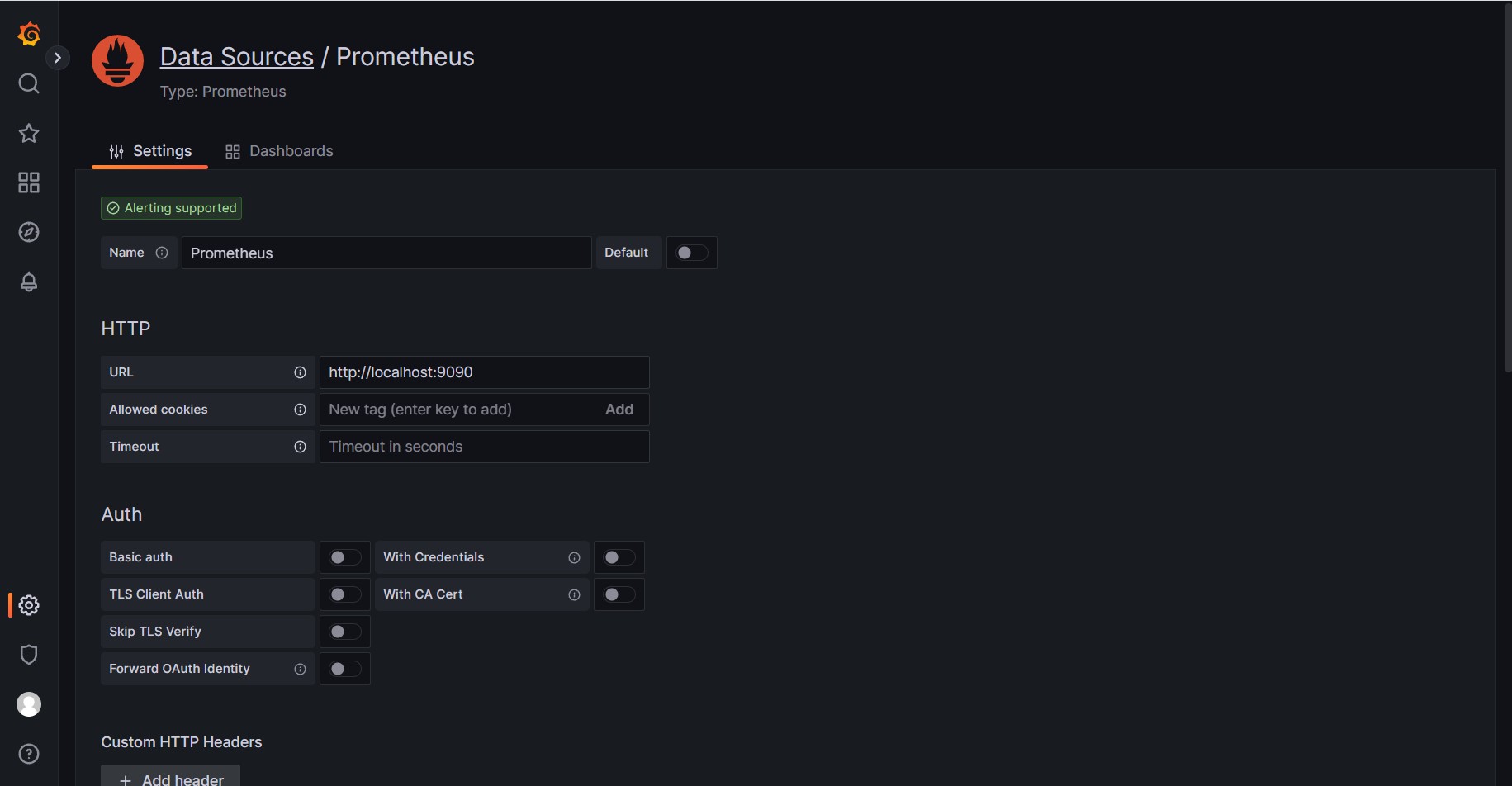
As a result, we use Grafana to help us manage all graphs together. First of all, we should install Grafana in the computer you need to monitor pgmoneta metrics. You can browse Grafana web page with default port 3000, default user admin and default password admin. Then you can create Prometheus data source of pgmoneta.
Finally you can create dashboard by importing contrib/grafana/dashboard.json and monitor metrics about pgmoneta.